

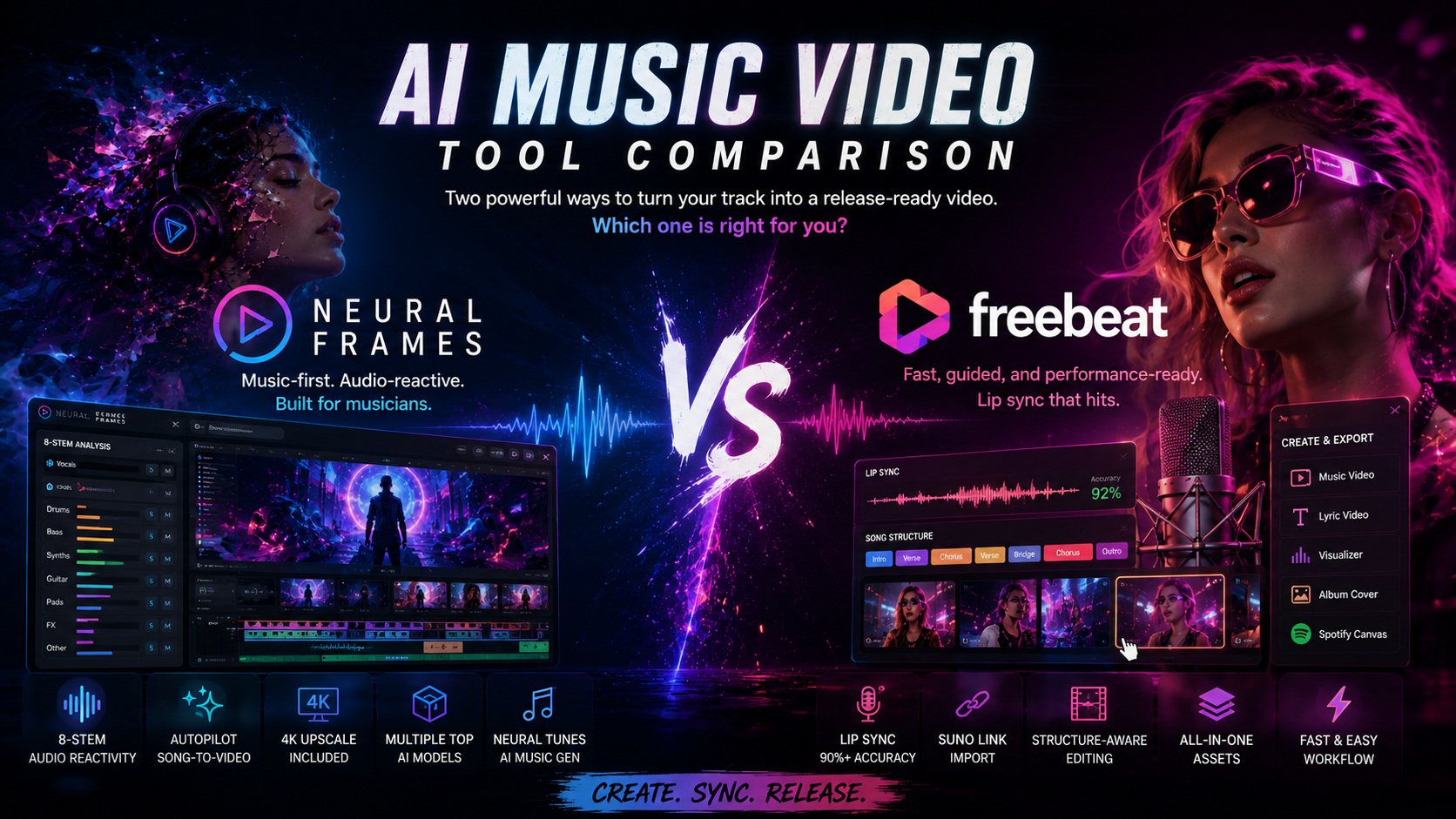
Neural Frames vs Freebeat: Which AI Music Video Generator Should You Use in 2026?
Neural Frames and Freebeat are two of the leading music-first AI video tools in 2026. Both start from your song rather than from a generic text prompt, so they get compared constantly. They come from different philosophies, though. Neural Frames was built by a musician, for music creators, and it shows in the depth of the product: it breaks your track into eight audio stems, reacts to what is actually happening in the mix, and is designed around the way producers and artists already work. Freebeat takes a faster, more conversational approach focused on getting a performance-style video out quickly, especially from a Suno link.
The short answer: if you want audio-reactive depth, real creative control, and a tool built around how music creators actually work, Neural Frames is the stronger fit. If your priority is a fast, vocalist-led performance video and your track lives in Suno, Freebeat is worth a serious look.
The rest of this article breaks down how they compare across the dimensions that matter when you are choosing one.
At a Glance
| Neural Frames | Freebeat | |
|---|---|---|
| Made for | Built by a musician, for music creators | General creators wanting fast output |
| Audio analysis | 8-stem separation (vocals, drums, bass, synths, and more) | BPM, beats, bars, and full song structure |
| Interaction model | Autopilot (one click) plus a frame-by-frame editor | Conversational, agent-driven, with storyboard editing |
| Creative ceiling | Low floor, high ceiling; control down to the frame | Prompt-led; control mostly through the AI Director |
| Lip sync | Available, not the core focus | Core strength; advertised at around 90%+ accuracy |
| Generation models | Multiple bundled (Kling, Seedance, Runway) | Large library, including Veo 3.1 and Nano Banana Pro |
| Music generation | Native, via Neural Tunes | Bundled third-party music models (Suno, MiniMax, Mureka) |
| Max resolution | Up to 4K (upscaling) | Up to 1080p |
| Suno workflow | Upload supported | Native link import (paste and go) |
| Entry price | $26/month | $6.99/week or $34.99/month |
What They Have in Common
Both are music-first platforms, which means the AI analyzes your audio and plans visuals around it rather than playing your song over unrelated clips. Both can take a finished track and return a synchronized video in minutes. Both target independent musicians and creators without a film budget, and both export in the aspect ratios you need for YouTube, TikTok, Reels, and Spotify Canvas. Both can now generate music as well as video.
That shared foundation is real. The decision comes down to how deeply each one understands your music, how much control you get, and how the tool feels to actually use.
1. Audio Understanding and Synchronization
This is the clearest technical difference between the two.
Neural Frames separates every track into eight stems, including vocals, drums, bass, and synths, and drives the visuals from individual elements of the mix. A hi-hat pattern, a vocal phrase, or a bass drop can each move the image independently. For electronic, instrumental, and beat-driven music, this produces a tighter, more responsive relationship between sound and motion than tools that react only to the overall waveform. It is also the kind of feature you build when you think like a producer, because it maps directly onto how a track is actually constructed.
Freebeat analyzes the track at the level of BPM, individual beats, bars, and full song structure, then plans a shot sequence before generating any frames so cuts land on beats and pacing builds into the chorus. This is genuinely structure-aware editing, and it works well for songs with clear sections and vocals. It maps the shape of the song rather than reacting to each instrument in the mix.
Bottom line: Neural Frames reacts to the components of the sound; Freebeat maps the shape of the song. For instrumental and electronic work, the stem-level reactivity is the differentiator.
2. How It Feels to Use: Control, Depth, and Reliability
This is where the two products diverge most, and it is worth spending time on.
Neural Frames is deliberately low floor, high ceiling. Autopilot gives a complete beginner a polished, beat-matched video from a single upload in roughly ten to fifteen minutes. When you want more, you can drop into a frame-by-frame editor that works like a digital audio workstation for video, adjusting animation parameters shot by shot. Because the product was designed by and for music creators, the interface maps onto how artists already think about a track, from stems to song sections, and the UI and UX are refined around helping a music creator reach the best possible result, not just a fast one. The range, from fully automatic to fully hands-on, is its signature.
Freebeat is built around a conversational, agent-driven workflow. You describe what you want, and its AI Director interprets the prompt and assembles the video by orchestrating external generation models. That makes it approachable and quick. The tradeoff is that most of your control runs through prompting rather than direct, hands-on editing, so when you want to shape a specific moment precisely, the result can depend heavily on how the underlying model interprets your words, and a prompt-first interface can start to feel limiting. Freebeat also offers extras such as real-time generation, which is genuinely fun to experiment with but in practice reads more as an exploratory novelty than a feature you would build a finished release around.
Reliability is part of the experience too. Creators frequently cite stability as a reason they prefer Neural Frames, reporting more consistent results and fewer interruptions across longer projects. Render reliability matters more than it sounds, because a tool that fails partway through a long project quietly costs you time and credits.
Bottom line: Freebeat is faster to pick up and good for quick output. Neural Frames goes deeper, gives you a real creative ceiling, and tends to feel more stable on bigger projects.
[Screenshot slot: Neural Frames Autopilot storyboard view and the frame-by-frame editor side by side. These two screens make the low-floor, high-ceiling story concrete.]
3. Lip Sync, Characters, and Performance Videos
This is where Freebeat leads, and it is worth stating plainly.
Lip sync is the feature Freebeat promotes most heavily, with the company advertising roughly 90%-plus accuracy on vocal tracks across many languages. It also maintains character consistency across a sequence of shots and supports performance-oriented modes for concert-style and narrative videos. If your concept is built around a singer or rapper appearing on camera, on-camera mouth movement is the capability that decides whether the result is believable, and Freebeat is purpose-built for it.
Neural Frames supports character consistency, with the strongest results coming from training a custom model on your own images or art, and it offers lyric synchronization through its timestamped Lyric Showcase. Lip sync is available but is not the center of the product the way it is for Freebeat.
Bottom line: for performance videos with a visible, singing vocalist, Freebeat is the more focused choice. For audio-reactive, abstract, or stylized visuals, that gap matters less.
4. Generation Models and Visual Range
Both platforms route to leading underlying video models rather than relying on a single engine, so raw clip quality is largely a function of the models each offers.
Neural Frames bundles several top-tier models, including Kling, ByteDance's Seedance, and Runway, inside a single subscription, and includes 4K upscaling on its higher tiers. Its multi-model range spans distinctive audio-reactive and stylized output through to cinematic clips, depending on the model you pick.
Freebeat advertises access to a large library of models, including Google's Veo 3.1 and the Nano Banana Pro image model, with named visual styles such as cinematic, anime, and neon noir. Its output tops out at 1080p.
Bottom line: both give you model flexibility. The practical separator here is resolution: Neural Frames reaches 4K, while Freebeat caps at 1080p.
5. Inputs and Workflow
Freebeat's standout convenience is its native link import. You can paste a public Suno link and Freebeat extracts the audio, runs its structural analysis, and starts building automatically, with no download or format conversion. It accepts links from other sources as well, including Udio, YouTube, and SoundCloud. For creators whose music already lives in Suno, this removes real friction.
Neural Frames works from uploaded audio and supports tracks from Suno, ElevenLabs, and other sources, with the usual commercial-rights caveats that apply to AI-generated music regardless of the video tool you use.
Bottom line: if you generate in Suno and want the shortest path from track to video, Freebeat's paste-a-link workflow is the smoother on-ramp.
6. Music Generation: Two Different Approaches
Both tools can now generate music, not just video, but they approach it differently.
Neural Frames offers Neural Tunes, a native AI music generator built on the same audio-analysis engine that powers its visuals. You can write the song and produce the video inside one unified pipeline, which fits the build-by-musicians, for-musicians philosophy of the product.
Freebeat takes an aggregation approach, bundling free monthly generations from a set of third-party music models, including Suno, MiniMax Music, Mureka, ACE STEP, and Sonauto, with the quotas scaling by plan.
Bottom line: Neural Frames integrates music generation natively into one workflow; Freebeat bundles access to several external music models. Choose based on whether you value a single integrated pipeline or a wider menu of separate music engines.
7. Pricing
Both use credit-based subscriptions, and credit values do not translate one-to-one between platforms, so compare on capability rather than raw credit counts. Always confirm current pricing on each site before committing.
Neural Frames
- Neural Knight: $26/month (2,400 credits, 7 models, stem extraction, audio-reactive effects, horizontal-to-vertical conversion, 1080p upscaling)
- Neural Ninja: $66/month (7,200 credits, 10 models, everything in Knight plus 4K upscaling, recommended for Autopilot)
- Neural Nirvana: $199/month (24,000 credits, 10 models, 4K upscaling with priority processing, best for Autopilot)
Freebeat (standard pricing; an annual plan saves around 30%)
- Basic: $6.99/week (1,990 credits per week, up to 720p, watermark removal)
- Pro: $34.99/month (10,000 credits per month, up to 720p)
- Ultimate: $49.99/month (19,000 credits per month, up to 1080p)
- Creator: $249/month (95,000 credits per month, up to 1080p)
Bottom line: two concrete differences stand out. Neural Frames includes 4K upscaling on its Ninja and Nirvana tiers, while Freebeat tops out at 1080p. And Neural Frames delivers 1080p at its entry $26 Knight tier, whereas Freebeat's 1080p only starts at the $49.99 Ultimate plan. Freebeat's $6.99 weekly option is a low-commitment way to try the tool.
Which One Should You Choose?
There is no universal winner. Match the tool to the job.
Choose Neural Frames if you:
- Make electronic, instrumental, or beat-driven music where stem-level reactivity matters
- Want both a one-click mode and real frame-by-frame control in the same tool
- Want a tool built by and for music creators, with a UI that maps onto how you already work
- Care about 4K output and access to multiple premium models in one subscription
- Want a single pipeline from writing the song to rendering the finished video
- Value stability and consistent results on longer projects
Choose Freebeat if you:
- Are making a performance video with a visible, singing vocalist where lip sync is decisive
- Generate your music in Suno and want a paste-a-link workflow
- Prefer a fast, conversational workflow over a deeper editor
- Want the lowest-commitment entry point to test with
For most musicians who want depth, control, and a tool designed around how they actually work, Neural Frames is the stronger all-round platform. For fast, vocalist-led videos sourced from Suno, Freebeat is the sharper specialist.
FAQ
Is Neural Frames or Freebeat better for Suno songs? Both work with Suno tracks. Freebeat has the smoother on-ramp because you can paste a public Suno link and it imports the audio automatically, while Neural Frames works from an uploaded file. Commercial use of a Suno track generally requires a paid Suno plan with either tool.
Which has better lip sync? Freebeat. Lip sync is its core focus, advertised at around 90%-plus accuracy, which makes it the better choice for performance videos with a visible vocalist. Neural Frames supports character consistency and lyric sync but does not center the product on lip sync.
Which is better for instrumental or electronic music? Neural Frames, because its eight-stem audio analysis reacts to individual elements of the mix rather than only to the song's overall structure, which suits beat-driven and instrumental tracks.
Which has higher video quality? Neural Frames reaches 4K through upscaling on its higher tiers. Freebeat tops out at 1080p, and only on its Ultimate and Creator plans.
Which is easier to use, and which is more powerful? Freebeat's conversational workflow is quick to pick up. Neural Frames is low floor, high ceiling: Autopilot is just as easy for a first video, and the frame-by-frame editor gives you far more control when you want it.
Can both generate the music too? Yes. Neural Frames generates music natively through Neural Tunes, and Freebeat bundles free generations from third-party music models such as Suno, MiniMax, and Mureka.
Which is cheaper? Freebeat has a low weekly entry at $6.99, while Neural Frames starts at $26/month. Compare on capability rather than price alone, since the resolution caps and model access differ.
About This Comparison
This comparison is based on each platform's publicly documented features, pricing, and product positioning as of mid-2026. Both tools update frequently, and figures such as lip sync accuracy and model counts reflect each company's published claims. Reliability observations reflect commonly reported user sentiment rather than a controlled test. Verify current capabilities and pricing on the official sites before making a decision.